How to make a stop-motion movie on iPad
An iPad makes a great stop-motion studio: the big screen shows every move clearly, and it sits steady on a stand. Here's how to set one up and make your first movie.
- Time
- About 45 minutes
- Works on
- iPadOS 18 or later
- You need
- A stand and a lamp
- Cost
- Free
Step by step
-
Stand the iPad up
Put the iPad in a tablet stand, or on a tripod with a tablet clamp, facing the set. A stack of books works too. Mark its spot with tape: if it moves, the whole set jumps. Sideways makes a wide movie; upright makes a tall one.
Fold the cover out of the way so it doesn't block the back camera.
-
Use the back camera
The back camera faces the set while you watch the screen. Flip Camera in the + menu switches cameras.
Using the front camera? On many iPads it has Center Stage, which moves the picture around to follow faces. Open Control Center, tap Video Effects and turn Center Stage off.
-
Light the set
Use a lamp, not a window: daylight changes as clouds pass, and that shows up as flicker. After the first picture, the app locks the camera's focus, exposure and white balance, so as long as the light stays put, every picture matches.
-
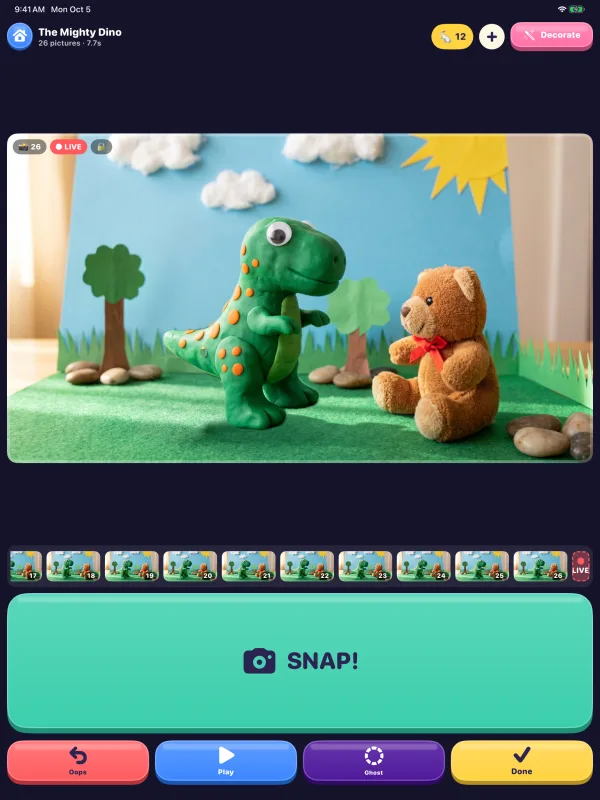
Snap without touching the iPad
Tapping the screen can nudge the iPad. A keyboard works instead: Space or Return snaps, Delete is Oops, P plays and G turns Ghost on and off. So do the volume buttons, a Bluetooth camera remote, a foot pedal or a game controller.
Or turn on Auto Snap from the + menu: move something, take your hands away, and it snaps once everything is still.
-
Put the stage on a TV
Connect a TV or projector with a USB-C to HDMI adapter, or use AirPlay. The TV shows the live stage, big, and the iPad becomes the remote.
In a classroom or museum, turn on Museum mode in Settings and start Guided Access, so each visitor gets a fresh movie and stays in the app.
-
Decorate and save
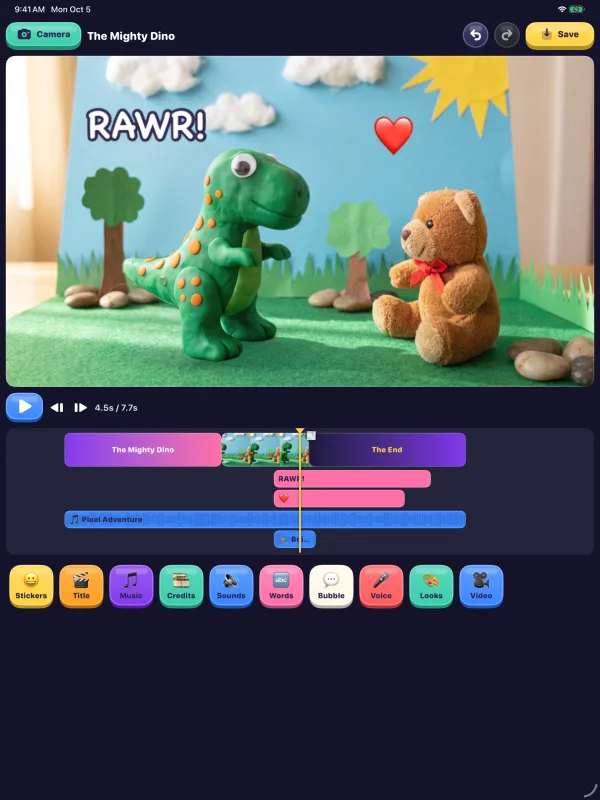
Tap the pink magic wand to add words, speech bubbles, 54 sound effects, a title and rolling credits, and drag them along the timeline. Tap Save, or press Done twice, and the movie goes to Photos.
With iCloud on, the movie shows up on your iPhone and Mac too, so you can snap on the iPad and finish anywhere.
Tips
Plug it in
The screen stays on while you animate.
Go sideways for a TV
A wide movie fills a TV or projector.
Take turns
One person moves the toys, one snaps.
Try Studio mode
Manual camera, time-lapse and a frame editor, in Settings.
Questions
Can you do stop motion on an iPad?
Yes. Stop Motion Movie Maker turns any iPad with iPadOS 18 or later into a stop-motion camera: snap a picture, move something a tiny bit, and snap again.
Which iPad camera is best for stop motion?
The back camera: it faces the set while you watch the screen. If you use the front camera, turn off Center Stage in Control Center so the picture doesn't move.
Do I need a tripod for stop motion on an iPad?
No, but the iPad has to stay perfectly still. A tablet stand or a stack of books works; mark the spot with tape.
Can I show the movie on a TV or projector?
Yes. Use a USB-C to HDMI adapter or AirPlay. The TV shows the live stage while the iPad is the remote.
Can I start on the iPad and finish on my iPhone or Mac?
Yes. With iCloud on, your movies show up on every iPhone, iPad and Mac signed in to the same Apple Account.
Is Stop Motion Movie Maker free on iPad?
Yes. It's free, with no ads and no account. Free movies save at 720p with a small badge; Stop Motion Pro is an optional one-time purchase that works on iPhone, iPad and Mac.
New to stop motion? Start with how to make a stop-motion movie, or browse all the guides.